Watch the comparison on YouTube →
🔔 Smart Doorbells — Aqara G410 vs G400 vs Reolink PoE
Three smart doorbells. Different approaches. Which one belongs at your front door?
Learn it. Compare it. Put it into practice.
Smart doorbells have come a long way.
What started as a convenient way to see who's at the front door has turned into a surprisingly complicated decision involving cameras, networking, storage, subscriptions, and smart home integration.
And if you're running Home Assistant, the decision gets even more interesting.
Do you choose an Aqara doorbell designed around smart home integration? A wired PoE solution? Or something that gives you more control over how your video is stored and accessed?
That's what this guide explores.
The goal isn't to find the most expensive doorbell.
It's to find the one that actually makes sense for your home.
📚 Explore This Guide
- 🎬 Watch the Doorbell Comparison
- ⚖️ What Matters When Comparing Doorbells
- 🏠 Aqara Smart Doorbells
- 🔌 Reolink PoE Doorbell
- 🧠 Home Assistant Integration
- 🎯 Which Doorbell Should You Choose?
- 🛒 Equipment & Product Links
🎬 Watch the Doorbell Comparison
Aqara G410 vs G400 vs Reolink PoE — Which Smart Doorbell Is Better?
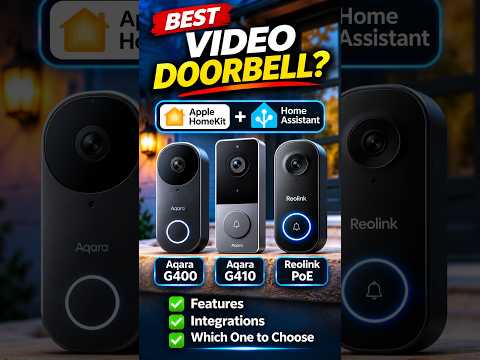
▶ Watch the Full Doorbell Comparison on YouTube
In this comparison, we explore three smart doorbell options and the practical considerations that can make one a better choice than another.
Rather than focusing only on camera specifications, I want to look at how these products fit into an actual smart home.
Because a doorbell that looks great on paper isn't necessarily the best one for your setup.
⚖️ What Matters When Comparing Doorbells?
A smart doorbell needs to do more than capture video.
It needs to work reliably, provide useful notifications, and fit into your existing infrastructure.
| Category | What I Look For |
|---|---|
| 📷 Video Quality | Resolution, clarity, field of view, and night visibility |
| 🔌 Power | Wired power, PoE, or battery requirements |
| 🌐 Connectivity | Wi-Fi, Ethernet, and network reliability |
| 💾 Storage | Local recording, cloud storage, and subscription requirements |
| 🏠 Smart Home Integration | Home Assistant, Apple Home, and other ecosystems |
| 🔔 Notifications | Motion, person detection, and doorbell events |
| 🔒 Privacy | Cloud dependencies and local access |
| ⚡ Reliability | Behavior during outages and network problems |
| 💰 Long-Term Cost | Hardware, installation, and ongoing fees |
| 🛠️ Installation | Existing wiring, Ethernet availability, and mounting |
Not every home needs the same features.
And not every doorbell is designed for the same type of installation.
🏠 Aqara Smart Doorbells
Smart home integration matters
Aqara has built an ecosystem of smart home devices, including sensors, hubs, switches, and doorbells.
For someone already using Aqara products, choosing a doorbell from the same ecosystem may offer advantages.
The important questions are how each model connects, what features are available locally, and which integrations require additional hardware or services.
Aqara G410
When evaluating the G410, I would consider:
- Compatibility with your existing smart home ecosystem
- Video and notification capabilities
- Available local and cloud features
- Power and connectivity requirements
- Integration options for Home Assistant
- Long-term support and operating costs
Aqara G400
For the G400, I'd evaluate many of the same categories while paying particular attention to its installation requirements and connectivity options.
The important question isn't simply whether one model is newer or has more features.
It's whether those differences actually matter for your home.
Before purchasing either model, verify its regional availability, supported features, and compatibility with your existing smart home equipment.
🔌 Reolink PoE Doorbell
When you prefer a wired network connection
One reason PoE security cameras are attractive is that they can use an Ethernet connection for both data and power.
For homeowners who already have network infrastructure or are comfortable running Ethernet cable, this can be a practical approach.
Why I'd consider PoE
- Wired network connectivity
- Power delivered through compatible Ethernet equipment
- No doorbell battery to recharge
- Potential integration with local video recording systems
- Less dependence on Wi-Fi signal quality
- Useful for network-focused smart home installations
Things to consider
- Requires compatible PoE power equipment
- Ethernet cable must reach the installation location
- Installation may be more involved
- Recording and integration features depend on the model and configuration
- Network equipment needs power to remain operational
My take: A PoE doorbell is worth serious consideration if you're already building a wired camera network or want to avoid relying on Wi-Fi at your front door.
🧠 Home Assistant Integration
The doorbell is only part of the automation
For me, one of the most interesting questions is what happens after someone presses the button.
Can Home Assistant receive the event?
Can it trigger an automation?
Can I use the camera feed in a dashboard?
Can the system notify different devices depending on whether someone is home?
Those possibilities are what make smart home integration valuable.
Examples of useful automations
- Send a notification when someone rings the doorbell
- Display a supported camera feed on a dashboard
- Turn on exterior lighting when motion is detected
- Announce doorbell events through compatible speakers
- Trigger different notifications based on presence
- Save supported camera events to a local recording system
These are examples of possible automations, not guaranteed features of every model.
Important: Integration support can vary significantly. A doorbell may work with an ecosystem without exposing every camera feature or event to Home Assistant.
Always verify the specific model and integration before purchasing.
🔒 Local Storage, Cloud Services & Privacy
This is an area where I think buyers should pay particular attention.
Some doorbells emphasize cloud services and manufacturer applications.
Others offer local recording or network video capabilities.
But local storage and local control are not necessarily the same thing.
A doorbell might save recordings locally while still relying on a cloud service for certain notifications or account features.
Before choosing a model, ask:
- Where are recordings stored?
- Can I access video locally?
- Are subscriptions required for important features?
- What happens when internet access is unavailable?
- Can I back up recordings?
- Which features require the manufacturer's app?
The goal is to understand what you control and what depends on someone else's servers.
⚡ Reliability & Installation
A doorbell is one of those devices you don't want to troubleshoot every time somebody visits.
Wi-Fi coverage, power delivery, network equipment, and installation quality can all affect reliability.
Wi-Fi Installations
Make sure the signal is strong enough at the doorbell's actual mounting location.
A good connection inside your house doesn't always mean a good connection outside your front door.
PoE Installations
Plan for the cable route, compatible network equipment, and available power.
A PoE doorbell can avoid Wi-Fi problems, but it still depends on the connected networking equipment.
Power Outages
If your router, switch, recorder, or doorbell loses power, some or all functionality may stop.
Backup power can help, but only when the necessary equipment is included in the backup plan.
🎯 Which Doorbell Should You Choose?
Rather than declaring one universal winner, I'd start with your priorities.
| Your Priority | What I'd Investigate First |
|---|---|
| Already invested in Aqara | Aqara G410 or G400 |
| Want a wired Ethernet connection | Reolink PoE or another verified PoE option |
| Prefer avoiding Wi-Fi for video | A compatible wired doorbell |
| Want Home Assistant automation | Verified integrations and exposed events |
| Want local video recording | Supported local recording and streaming options |
| Want minimal installation work | Compatibility with existing wiring |
| Want to minimize subscriptions | Features available without a paid plan |
| Want Apple Home integration | Model-specific Apple Home compatibility |
My recommendation: Choose the installation and ecosystem that fit your home first. Then compare the features that matter most to you.
A great camera isn't much use if it can't reliably connect to your network.
🛒 Equipment & Product Links
Here are the three smart doorbells featured in my comparison.
🏠 Aqara G410 — Smart Home Integration & Flexibility
The Aqara G410 combines a 2K video doorbell with smart-home hub functionality.
- Native Apple HomeKit Secure Video support
- Built-in Aqara Zigbee and Matter hub features
- mmWave presence detection
- Battery or hardwired power options
- Home Assistant integration options, including RTSP when hardwired
🔌 Aqara G400 — PoE Meets Apple Home
The Aqara G400 combines wired networking with native Apple Home integration.
- Native Apple HomeKit Secure Video support
- Power over Ethernet (PoE)
- Wired Ethernet or Wi-Fi connectivity
- RTSP and ONVIF support for local video integration
- Home Assistant integration possibilities
- Local recording options
📹 Reolink Video Doorbell PoE — Local Recording & Control
The Reolink PoE Doorbell is designed for users who prefer wired networking and local video recording.
- Wired Ethernet and PoE power
- Local recording options
- Home Assistant integration
- RTSP and ONVIF support
- No native Apple HomeKit support
- Apple Home integration possible through additional software such as Scrypted
🛒 Check Out the Reolink Video Doorbell PoE
⚖️ Quick Buying Guide
| Your Priority | Doorbell to Consider |
|---|---|
| Apple HomeKit Secure Video and smart-home hub features | Aqara G410 |
| Apple HomeKit Secure Video with PoE | Aqara G400 |
| Wired networking and local recording | Reolink PoE |
| Native Apple Home integration | Aqara G410 or G400 |
| Home Assistant with RTSP/ONVIF | Aqara G400 or Reolink PoE |
| Battery-powered installation | Aqara G410 |
| Avoiding additional Apple Home bridging software | Aqara G410 or G400 |
Important: Apple HomeKit Secure Video recording requires an eligible iCloud+ plan and Apple home hub. Home Assistant functionality varies by model and integration method.
Affiliate Disclosure
Some links in this guide are affiliate links. If you purchase through them, I may earn a commission at no additional cost to you.
Affiliate relationships do not guarantee positive reviews or recommendations.
Prices, specifications, and availability may change. Always verify current details before purchasing.
Affiliate Disclosure
Some product links in this repository may be affiliate links.
If you purchase through an affiliate link, I may earn a commission at no additional cost to you.
Affiliate relationships do not guarantee positive reviews or recommendations.
Prices, specifications, subscriptions, and availability can change. Always verify current details before purchasing.
💬 Questions, Corrections & Suggestions
Have experience with any of these doorbells?
Running one with Home Assistant?
Found a better integration or a limitation worth mentioning?
Open a GitHub Issue and share what you've learned.
Real-world experience is often more valuable than a marketing specification sheet.
🔗 More from Purpose in Practice
- [⚖️ All Tech Guides & Comparisons](../README.md)
- [🏠 Home Assistant Hardware Comparison](../home-assistant-hardware/README.md)
- [🔐 Smart Home Security Comparison](../smart-home-security/README.md)
- 🏠 ESPHome MultiSensor
- 🎬 Purpose in Practice on YouTube
- 🏠 Main GitHub Profile
Turn curiosity into capability.
Learn something. Compare your options. Build what makes sense. Put it into practice.