Watch the comparison on YouTube →
🔐 Smart Home Security — Alarmo vs Ring vs SimpliSafe
DIY flexibility or dedicated security hardware. Which approach makes more sense?
Learn it. Compare it. Put it into practice.
Home security has changed quite a bit.
You can purchase a complete security system from companies like Ring or SimpliSafe, or you can build your own using Home Assistant, Alarmo, and compatible sensors.
But just because you can build something yourself doesn't necessarily mean you should.
There are trade-offs involving cost, convenience, reliability, monitoring, and the amount of control you want over your system.
This guide explores those differences and takes a closer look at how I approached building my own physical Alarmo keypad.
📚 Explore This Guide
- 🎬 Watch the Security Comparison
- ⚖️ Compare the Three Systems
- 🏠 Home Assistant & Alarmo
- 🔔 Ring Alarm
- 🛡️ SimpliSafe
- 🚨 Professional Monitoring
- 🛠️ My DIY Alarmo Keypad
- 🛒 Equipment Links
🎬 Watch the Security Comparison
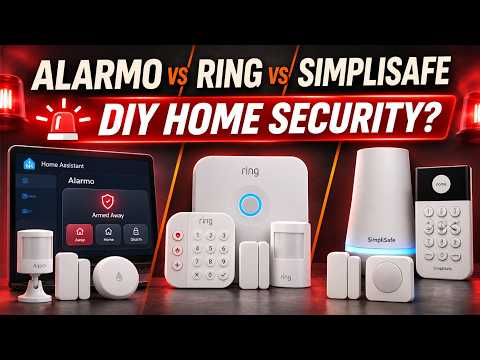
Alarmo vs Ring Alarm vs SimpliSafe — Is DIY Home Security Better?
▶ Watch the Full Comparison on YouTube
In this video, I compare three different approaches to home security:
- Alarmo: A customizable DIY security system built around Home Assistant.
- Ring Alarm: A dedicated security system that integrates with the Ring ecosystem.
- SimpliSafe: A purpose-built security system with optional professional monitoring.
The goal isn't to declare one system universally better.
It's to figure out which approach makes the most sense for your home.
⚖️ Security System Comparison
| Feature | 🏠 Alarmo | 🔔 Ring Alarm | 🛡️ SimpliSafe |
|---|---|---|---|
| System Type | Home Assistant integration | Dedicated alarm hardware | Dedicated alarm hardware |
| Initial Setup | DIY configuration | Guided installation | Guided installation |
| Alarm Software | Free | Included with hardware | Included with hardware |
| Hardware Required | Compatible HA host, sensors, and alarm devices | Ring Alarm equipment | SimpliSafe equipment |
| Customization | Extensive | More limited | More limited |
| Home Assistant Integration | Native to HA | Third-party integration possibilities | Third-party integration possibilities |
| Self-Monitoring | Configurable DIY alerts | Available; features vary by plan | Available; features vary by plan |
| Professional Monitoring | Possible through separate services and integrations | Available with eligible paid plan | Available with eligible paid plan |
| Cellular Backup | Must be separately designed and supported | Available with eligible plan | Available with eligible plan |
| Local Automation | Extensive | Limited compared with HA | Limited compared with HA |
| Maintenance | Your responsibility | Vendor-supported ecosystem | Vendor-supported ecosystem |
| Best For | DIY enthusiasts | Ring ecosystem users | Dedicated security-focused setups |
Important: Features, subscriptions, and backup capabilities change over time. Verify current plans and compatibility before purchasing.
🏠 Home Assistant & Alarmo
Build the system you want
Alarmo is a custom Home Assistant integration that allows you to create an alarm system using compatible sensors already connected to Home Assistant.
Instead of purchasing an entirely separate alarm ecosystem, you can configure sensors, arming modes, delays, notifications, and other actions.
Why I like Alarmo
- Free, open-source alarm software
- Integrates directly with Home Assistant
- Supports multiple arming modes
- Uses compatible existing sensors
- Configurable entry and exit delays
- Multiple users and PIN codes
- Custom notifications and automations
- Supports multiple independently controlled areas
- Can work with custom ESPHome devices
Things to consider
- Requires a functioning Home Assistant installation
- Sensor compatibility and reliability matter
- You must configure and maintain the system
- Hardware is not free
- Remote notifications may require internet connectivity
- Professional monitoring isn't included
- Backup power and connectivity require planning
My take: Alarmo is an excellent choice for someone who already uses Home Assistant and enjoys building a customized smart home.
But a DIY security system also means taking responsibility for its reliability.
🔔 Ring Alarm
A dedicated security system with a familiar ecosystem
Ring Alarm is designed to provide a more straightforward security experience.
Rather than assembling different hardware components and configuring everything yourself, you purchase compatible Ring Alarm equipment and follow the manufacturer's setup process.
Advantages
- Dedicated alarm hardware
- Guided installation
- Integration with Ring devices and services
- Optional professional monitoring
- Cellular backup with eligible subscriptions
- Less DIY configuration than Alarmo
Things to consider
- Subscription-dependent features
- Less customization than Home Assistant
- More dependence on the manufacturer's ecosystem
- Compatibility with third-party hardware is limited
My take: Ring makes sense if you already use Ring cameras or doorbells and want a dedicated alarm system that fits into that ecosystem.
🛡️ SimpliSafe
Security without turning it into another hobby
SimpliSafe focuses on dedicated security equipment and relatively straightforward installation.
It's an option for people who want a security system without building and maintaining a custom automation platform.
Advantages
- Dedicated security hardware
- Guided setup
- Optional professional monitoring
- Compatible security sensors and accessories
- Backup features with supported equipment and plans
Things to consider
- Monitoring and advanced features may require subscriptions
- Limited customization compared with Alarmo
- More restricted third-party integrations
- Ongoing service costs can affect long-term value
My take: SimpliSafe is worth considering when your priority is a dedicated alarm system rather than a broader smart home automation project.
🛒 SimpliSafe 9-Piece Security System with Camera
🚨 What About Professional Monitoring?
This is one of the most important differences to understand.
Self-monitoring and professional monitoring are not the same thing.
With self-monitoring, your system can alert you when something happens. You're responsible for evaluating the situation and contacting emergency services when necessary.
With professional monitoring, a monitoring center can respond to qualifying alarm events according to its service procedures.
Alarmo and Noonlight
Alarmo does not include professional monitoring.
There are community approaches to connecting Home Assistant with services such as Noonlight, but these integrations should not be treated as equivalent to manufacturer-supported monitoring without verification.
Noonlight professional monitoring is not free.
Before relying on any third-party monitoring integration, verify current service availability, pricing, compatibility, and how alarm events are handled.
Ring and SimpliSafe
Both offer optional professional monitoring through eligible paid subscriptions.
Their available monitoring services, cellular backup, app features, and subscription requirements differ.
My recommendation: If professional monitoring is essential, investigate that requirement before choosing your hardware.
⚡ What Happens When the Internet or Power Goes Out?
This is something every security system owner should consider.
Alarmo
A locally configured Alarmo installation can continue operating without internet access if Home Assistant and its required local devices and networks remain functional.
However, a power failure can disable the system unless the necessary equipment has backup power.
Remote notifications and cloud-dependent services may also stop working during an internet outage.
Ring and SimpliSafe
Dedicated systems may offer backup batteries and cellular connectivity.
Exactly what continues working depends on the hardware, service plan, network coverage, and outage conditions.
The lesson: Don't assume any security system is completely protected against outages. Understand its failure points and test the backup features you depend on.
🛠️ Building My Own Alarmo Keypad
Because apparently controlling my alarm from a phone wasn't enough.
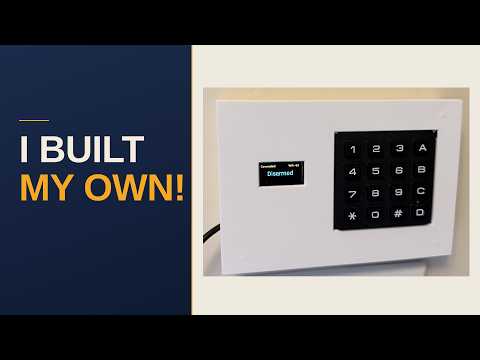
One of the things I wanted for my Home Assistant security system was a dedicated physical keypad.
Yes, I could use a phone.
Yes, I could use a tablet.
But I wanted something that felt more like a traditional alarm system while still giving me the flexibility of Home Assistant.
So I built one.
🎬 Watch My ESPHome Alarmo Keypad Build
▶ Watch the Alarmo Keypad Video
The project includes:
- ESP32-based controller
- Physical 4×4 keypad
- OLED status display
- Audible feedback
- ESPHome firmware
- Home Assistant and Alarmo integration
- Custom PCB development
- Custom 3D-printed enclosure
It started as a prototype in a project box.
Let's just say the early version wasn't winning any design awards.
But that's the fun part of building things.
You start with something that works, figure out what needs improving, and keep going.
🔧 Get the Project Files
ESPHome Alarmo Keypad — GitHub Repository
Visit the repository for available firmware, documentation, design files, and build information.
This is a DIY project, not a certified commercial security product. Evaluate and test it appropriately before relying on it for home protection.
🛒 Equipment & Product Links
These are some of the products discussed in the comparison and related Home Assistant security projects.
| Equipment | Product Link |
|---|---|
| 🟢 Home Assistant Green | View Product |
| 🚪 Aqara Door & Window Sensor 3-Pack | View Product |
| 🚶 Aqara Motion Sensor P1 3-Pack | View Product |
| 💧 Aqara Water Leak Sensor 3-Pack | View Product |
| 🔔 Ring Alarm 14-Piece Kit | View Product |
| 🛡️ SimpliSafe 9-Piece Security System with Camera | View Product |
A Note About Zigbee
Aqara Zigbee sensors require a compatible Zigbee coordinator or hub and appropriate integration.
Home Assistant Green does not include a built-in Zigbee radio.
Also, a water leak sensor is useful for detecting leaks and generating alerts, but it isn't automatically a burglary detection sensor.
Affiliate Disclosure
Some links in this guide are affiliate links. If you purchase through them, I may earn a commission at no additional cost to you.
Affiliate relationships do not guarantee positive reviews or recommendations.
Prices, product specifications, and subscription terms may change. Always verify current details before purchasing.
🎯 Which System Would I Choose?
| Your Situation | Worth Considering |
|---|---|
| Already use Home Assistant extensively | 🏠 Alarmo |
| Want maximum customization | 🏠 Alarmo |
| Enjoy building custom hardware | 🏠 Alarmo |
| Already invested in Ring products | 🔔 Ring Alarm |
| Want a dedicated alarm ecosystem | 🔔 Ring or 🛡️ SimpliSafe |
| Want optional vendor-supported professional monitoring | 🔔 Ring or 🛡️ SimpliSafe |
| Don't want to maintain DIY security automations | 🔔 Ring or 🛡️ SimpliSafe |
| Want to reuse compatible existing HA sensors | 🏠 Alarmo |
There isn't one universally correct choice.
For someone like me who enjoys Home Assistant, ESPHome, and building custom devices, Alarmo offers a lot of interesting possibilities.
But I also recognize that not everyone wants to troubleshoot their security system.
Sometimes the best technology is the one you don't have to think about.
🔗 Resources & Further Reading
- Alarmo — Official GitHub Repository
- Home Assistant
- Ring Alarm
- SimpliSafe
- My ESPHome Alarmo Keypad Project
💬 Questions, Corrections & Suggestions
Are you using Alarmo, Ring, SimpliSafe, or something completely different?
Have you built your own security hardware?
Open a GitHub Issue and share your experience, questions, or suggestions.
Security technology changes, and real-world experience matters.
🔗 More from Purpose in Practice
- [⚖️ All Tech Guides & Comparisons](../README.md)
- [🏠 Home Assistant Hardware Comparison](../home-assistant-hardware/README.md)
- 🔐 ESPHome Alarmo Keypad Repository
- 🎬 Purpose in Practice on YouTube
- 🏠 Main GitHub Profile
Turn curiosity into capability.
Learn something. Compare your options. Build what makes sense. Put it into practice.
Home Assistant Security System: Alarmo Questions
Can Home Assistant be used as a home security system?
Home Assistant can coordinate door sensors, motion sensors, sirens and notifications. Alarmo adds an alarm-focused interface and arming logic. A DIY setup is not automatically equivalent to a professionally monitored alarm: consider reliability, power backup, alert delivery and your own ability to maintain it.
What is Alarmo for Home Assistant?
Alarmo is a community integration for configuring alarm modes and sensor behavior inside Home Assistant. It can be paired with a physical keypad, including a DIY ESPHome design. Explore the ESPHome Alarmo keypad project and its companion build video.
Do I need a subscription for Alarmo?
Alarmo itself is a community software integration. Optional services such as remote access, cellular backup or professional monitoring are separate decisions and may involve fees. Check the current integration documentation before planning a security-critical installation.
Alarmo setup and reliability checklist
Before relying on a DIY alarm, verify the sensors, arming modes, entry and exit delays, keypad behavior, siren and notifications. Test what happens during an internet outage, Home Assistant restart, lost sensor connection and keypad failure. A DIY alarm is not automatically equivalent to professionally monitored security.
- Choose sensors for each armed mode and verify their reported states.
- Configure Alarmo arming modes and delays using the current integration documentation.
- Test a real sensor trigger and a separate authorized disarm method.
- Check how the system behaves during outages and after restarts.
- Only then add more advanced lighting or thermostat automations.
Read the detailed Alarmo setup and reliability tutorial on GitHub. For the hardware build, see the ESPHome keypad project.