Watch the comparison on YouTube →
🌡️ Smart Thermostats — X7B vs Honeywell T9 vs RTH6580WF
Three smart thermostats. Three approaches to controlling your home's comfort.
Learn it. Compare it. Put it into practice.
A thermostat seems like a pretty simple device.
Your house gets cold, the heat comes on. Your house gets hot, the air conditioning kicks in.
Simple enough, right?
But smart thermostats can do quite a bit more.
Depending on the model, they can provide Wi-Fi connectivity, remote temperature adjustments, scheduling, smart home integration, and additional comfort features.
And some can cost considerably more than others.
So the question becomes:
How much smart thermostat do you actually need?
In this guide, we're looking at three options:
- 🌡️ X7B Smart Thermostat
- 📱 Honeywell Home T9
- 🏠 Honeywell RTH6580WF
The goal isn't to buy the most expensive thermostat.
It's to find the one that makes sense for your home, HVAC system, and budget.
📚 Explore This Guide
- ⚖️ Compare the Thermostats
- 🌡️ X7B Smart Thermostat
- 📱 Honeywell Home T9
- 🏠 Honeywell RTH6580WF
- 🔌 HVAC Compatibility
- 🧠 Home Assistant Integration
- 🎯 Which One Should You Choose?
- 🛒 Product Links
🔥❄️ Three Smart Thermostats You Need to See!
Smart thermostats offer different combinations of convenience, features, and affordability.
Some focus on straightforward Wi-Fi control.
Others offer more advanced comfort management, including compatible remote room sensors.
Before spending money, it's worth understanding what you're getting.
🎬 Watch the Smart Thermostat Comparison
🔥❄️ 3 Smart Thermostats You Need to See!
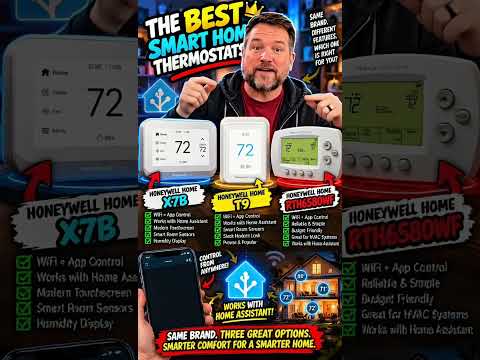
▶ Watch the Full Comparison on YouTube
Which smart thermostat is right for your home?
In this video, we explore three options:
- 🌡️ X7B Smart Thermostat — An alternative Wi-Fi thermostat worth investigating.
- 📱 Honeywell Home T9 — Smart temperature control with compatible remote room sensors.
- 🏠 Honeywell RTH6580WF — Straightforward Wi-Fi control and programmable scheduling.
We'll look at their features, practical differences, and what to consider before choosing a thermostat for your home.
Which one would you choose? Watch the comparison and share your thoughts in the comments!
⚖️ Smart Thermostat Comparison
| Feature | 🌡️ X7B | 📱 Honeywell T9 | 🏠 Honeywell RTH6580WF |
|---|---|---|---|
| Category | Wi-Fi smart thermostat | Smart thermostat with room-sensor support | Wi-Fi programmable thermostat |
| Wi-Fi Connectivity | Advertised | Yes | Yes |
| Remote App Control | Verify model and app | Yes | Yes |
| Scheduling | Verify model | Yes | Yes |
| Remote Room Sensors | Not confirmed | Supported | Not supported |
| Display | Model-dependent | Touchscreen | Traditional digital display |
| Smart Home Integration | Verify exact model | Supported integrations vary | Supported integrations vary |
| HVAC Compatibility | Verify exact model | Depends on system | Depends on system |
| Best For | Buyers exploring alternative options | Room-based comfort management | Straightforward Wi-Fi temperature control |
Important: X7B specifications can vary by manufacturer or listing. Confirm the exact model, wiring requirements, and supported features before purchasing.
🌡️ X7B Smart Thermostat
An alternative worth investigating
Not every smart thermostat needs to come from one of the biggest names in HVAC controls.
The X7B is one of the options featured in my comparison.
When evaluating a thermostat like this, I would pay particular attention to its supported HVAC systems, application, connectivity, and long-term software support.
What I'd Check Before Buying
- Supported heating and cooling equipment
- Conventional versus heat pump compatibility
- C-wire requirements
- Wi-Fi connectivity and application support
- Available scheduling options
- Smart home platform compatibility
- Manufacturer documentation and support
My take: The X7B may be worth considering, but verify its exact capabilities before treating it as interchangeable with a Honeywell thermostat.
🛒 Check Out the X7B Smart Thermostat
📱 Honeywell Home T9
When different rooms have different temperatures
One of the challenges with traditional thermostats is that they usually measure temperature in one location.
But your living room, bedroom, and upstairs hallway might all have different temperatures.
The Honeywell Home T9 addresses this with support for compatible smart room sensors.
These sensors can help the thermostat consider temperatures and occupancy in selected rooms when controlling a compatible HVAC system.
Why It's Interesting
- Wi-Fi connectivity
- Remote app control
- Touchscreen interface
- Compatible smart room sensors
- Room prioritization features
- Scheduling and comfort settings
- Smart home integration options
Things to Consider
- Remote sensors may be sold separately
- Compatibility depends on the HVAC system
- Smart features may depend on internet services
- Additional sensors don't create independent HVAC zones
My take: If comfort varies significantly between rooms, the T9's remote sensor capabilities are worth investigating.
Just remember that measuring temperature in another room isn't the same as independently controlling airflow to that room.
🛒 Check Out the Honeywell Home T9
🏠 Honeywell RTH6580WF
Straightforward Wi-Fi thermostat control
Sometimes you don't need advanced room sensing, elaborate displays, or complicated automation.
You just want to adjust the temperature from your phone and have a reliable schedule.
That's where a thermostat like the Honeywell RTH6580WF fits.
Why It's Interesting
- Wi-Fi connectivity
- Remote temperature control
- Seven-day programmable scheduling
- Traditional thermostat interface
- Familiar heating and cooling controls
- A simpler approach to connected HVAC management
Things to Consider
- No dedicated remote room-sensor system
- Older interface design
- Requires compatible HVAC wiring
- C-wire requirement
- Integration options depend on supported services
My take: The RTH6580WF is worth considering if your main goal is convenient Wi-Fi temperature control without paying for advanced features you won't use.
🛒 Check Out the Honeywell RTH6580WF
🔌 HVAC Compatibility Matters
This is more important than the screen or app.
Before purchasing any smart thermostat, make sure it supports your actual heating and cooling equipment.
Not every thermostat works with every HVAC system.
Some homes use conventional heating and cooling.
Others use heat pumps, auxiliary heat, emergency heat, multi-stage equipment, or specialized controls.
Check These First
- Conventional HVAC or heat pump
- Number of heating and cooling stages
- Auxiliary or emergency heat requirements
- Existing thermostat wiring
- Availability of a C-wire
- System voltage and control type
- Manufacturer compatibility documentation
Important: Most residential smart thermostats are designed for compatible low-voltage HVAC control systems. Do not assume compatibility with line-voltage heating equipment.
If you're unsure about your wiring or system type, consult the thermostat manufacturer's compatibility documentation or a qualified HVAC professional.
A thermostat that doesn't properly support your equipment can cause operating problems or equipment damage.
🧠 What About Home Assistant?
Since this is Purpose in Practice, we have to talk about Home Assistant.
A thermostat becomes much more interesting when it can participate in a larger automation system.
For example, depending on supported integrations, you might use Home Assistant to:
- Adjust temperature based on occupancy
- Change comfort settings when everyone leaves
- Coordinate heating and cooling with smart vents
- Monitor temperatures in different rooms
- Create dashboards for HVAC information
- Track equipment operation
- Trigger automations based on indoor conditions
But There's a Catch
Wi-Fi connectivity doesn't automatically mean Home Assistant compatibility.
Some thermostats expose supported cloud integrations.
Others may offer local interfaces or third-party integration options.
And some may not have a practical Home Assistant integration at all.
Before purchasing a thermostat specifically for Home Assistant, verify that the exact model exposes the controls and data you need.
🌬️ Can Smart Thermostats Fix Uneven Room Temperatures?
Not necessarily.
A smart thermostat can improve how your HVAC system responds to temperature information.
But if one room receives too much airflow and another receives too little, the underlying issue may involve ductwork, balancing, insulation, or equipment design.
Remote sensors can help the thermostat decide when to run heating or cooling.
They don't automatically redirect conditioned air.
That's one reason I've also experimented with smart vent controls and room-level temperature sensors.
Related DIY Projects
Smart vents also require care: restricting airflow can affect HVAC static pressure and equipment performance. They aren't a substitute for proper system design.
🎯 Which Thermostat Should You Choose?
| Your Priority | Thermostat to Investigate |
|---|---|
| Basic Wi-Fi temperature control | Honeywell RTH6580WF |
| Compatible remote room sensors | Honeywell T9 |
| Room-based comfort prioritization | Honeywell T9 |
| Traditional programmable thermostat interface | Honeywell RTH6580WF |
| Exploring alternative thermostat hardware | X7B |
| Home Assistant automation | Verify the exact model's integration |
| Heat pump or multi-stage HVAC | Verify manufacturer compatibility |
| Lowest long-term cost | Compare actual pricing and required services |
My Recommendation
Start by checking HVAC compatibility.
Then decide which features you actually need.
If you want room-sensor capabilities, the T9 deserves attention.
If you mainly want a programmable Wi-Fi thermostat, the RTH6580WF may be sufficient.
And if you're considering the X7B, make sure its documented capabilities and manufacturer support meet your requirements.
Don't pay for features you'll never use. But don't sacrifice HVAC compatibility just to save a few dollars.
🛒 Equipment & Product Links
| Thermostat | Product Link |
|---|---|
| 🌡️ X7B Smart Thermostat | View Product |
| 📱 Honeywell Home T9 | View Product |
| 🏠 Honeywell RTH6580WF | View Product |
Affiliate Disclosure
Some links in this guide are affiliate links. If you purchase through them, I may earn a commission at no additional cost to you.
Affiliate relationships do not guarantee positive reviews or recommendations.
Prices, product specifications, availability, and supported integrations may change. Always verify current details before purchasing.
💬 Questions, Corrections & Suggestions
Which thermostat would you choose?
The X7B, Honeywell T9, or RTH6580WF?
Already using one of these with Home Assistant?
Open a GitHub Issue and share your experience, suggestions, or corrections.
Real-world feedback helps make these guides more useful.
🔗 More from Purpose in Practice
- [⚖️ All Tech Guides & Comparisons](../README.md)
- [🏠 Home Assistant Hardware Comparison](../home-assistant-hardware/README.md)
- [🏠 Smart Home Ecosystems](../smart-home-ecosystems/README.md)
- 🌬️ Yet Another Smart Vent — Additions
- 🏠 ESPHome MultiSensor
- 🎬 Purpose in Practice on YouTube
- 🏠 Main GitHub Profile
Turn curiosity into capability.
Learn something. Compare your options. Build what makes sense. Put it into practice.
Home Assistant Thermostat: What to Look For
Which thermostat works best with Home Assistant?
Look for a model with an actively maintained integration and the controls your HVAC equipment requires. Verify whether the integration is local or cloud-dependent and whether it exposes temperature, setpoint, mode and fan controls. Compatibility varies by exact model.
Can a thermostat solve uneven temperatures between rooms?
Remote temperature sensors can help inform heating and cooling decisions, but they cannot correct every duct or airflow problem. See the DIY Home Assistant smart vent project for an experiment in room-level airflow control, along with its safety limitations.
What about building a thermostat with ESP32?
DIY thermostat projects can be useful for learning and customization, but controlling HVAC equipment requires careful electrical design, fail-safe behavior and compatibility checks. Watch the FTC Thermostat project update for an ongoing prototype rather than a finished, validated product.
FTC Thermostat: local-control project introduction
Watch the 36-second FTC Thermostat concept video to see the motivation for an ESP32-powered thermostat designed around local control. This is a concept-stage introduction, not evidence of a completed or safety-validated HVAC controller. The later ThermostatHat V3 project update discusses ongoing PCB development.